Deploying Astro to Cloudflare Workers, not Pages
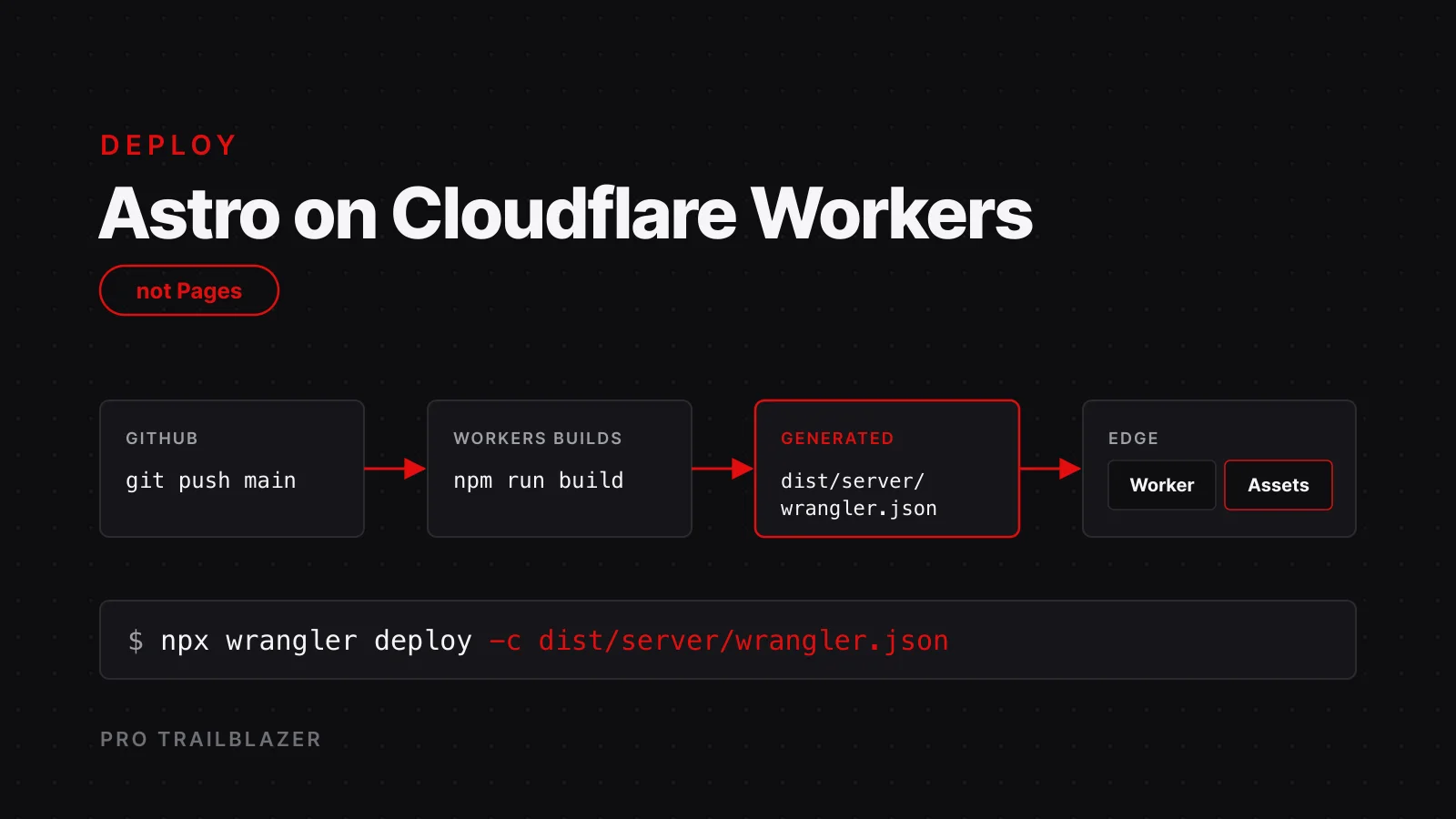
protrailblazer.com has run on Cloudflare Workers since July 2026, on Astro 7 and version 14 of the Cloudflare adapter. Getting there involved one deploy that pointed at the wrong config file, one boolean that made every image disappear in local development, and a trailing-slash decision that took an audit to settle. This is the checklist I wish had existed, with the reasoning for each step. The wider picture of the stack is in how this site is built.
Why Workers instead of Pages?
Cloudflare Pages started as static hosting with functions attached. Workers started as code at the edge and grew static asset serving later. Today the two overlap almost completely, but the platform investment goes to Workers. Cloudflare's own migration guide lists the features that exist only on Workers, including Durable Objects, cron triggers, gradual deployments, rate limiting, log push, and serving assets on a non-root path. The Pages-only list is short: file-based routing, custom domains outside your Cloudflare zone, and branch aliases.
Requests for static assets on Workers are free, and function invocations cost the same on both. So for a new project the question is not which is cheaper. It is which one you want to be on when the next feature ships. The one mental shift is routing order: Pages ran your code first, while Workers serves a matching static asset first and only invokes your script when no asset matches. Most of the gotchas below come from that reversal.
What does the adapter generate?
Astro is set to output: "server" with the Cloudflare adapter. Every page that can be static declares prerender = true, which here is all of them except the API routes. The build writes two directories: dist/client holds the prerendered HTML and every public asset, and dist/server holds the Worker bundle plus a generated wrangler.json.
That generated file is the real deploy config. The wrangler.toml at the project root is the build-time source: the adapter reads it, recomputes the entry point and the assets directory, and writes the result into the build output. Deploying with the root file instead of the generated one is the mistake that broke production once, because the paths in the root file are placeholders.
name = "protrailblazer"
main = "@astrojs/cloudflare/entrypoints/server"
compatibility_date = "2026-03-02"
compatibility_flags = ["nodejs_compat"]

routes = [
  { pattern = "protrailblazer.com", custom_domain = true },
  { pattern = "www.protrailblazer.com", custom_domain = true }
]

[assets]
binding = "ASSETS"
directory = "./dist/client"
run_worker_first = false

[vars]
POLAR_ENV = "sandbox"
Three lines matter more than the rest. The main entry has to be the adapter's server entrypoint, not a file you wrote. The nodejs_compat flag is what lets the Polar SDK and other Node-flavored dependencies run on the Worker. And run_worker_first decides whether your middleware ever sees static assets, which gets its own section below.
{
  "scripts": {
    "build": "astro build",
    "preview": "wrangler dev -c dist/server/wrangler.json",
    "deploy": "astro build && wrangler deploy -c dist/server/wrangler.json"
  }
}
Both preview and deploy pass -c dist/server/wrangler.json. If you remember one thing from this post, remember that flag.
How do you wire Workers Builds?
There is no GitHub Actions workflow in the repository. Workers Builds connects the Worker to the GitHub repository from the Cloudflare dashboard, listens to the production branch, and runs the build on every push. The settings that matter:
- Production branch:
main, which is the default. - Build command:
npm run build. - Deploy command: the default is
npx wrangler deploy, which uses the root config. Change it tonpx wrangler deploy -c dist/server/wrangler.json. - Non-production branches: the default is
npx wrangler versions upload, which creates a preview version without promoting it. That gives every feature branch a URL you can hand to a reviewer, which pairs well with an on-page feedback layer on the staging site. - Worker name: must match the
namefield in the Wrangler config, or the build fails with an unhelpful message.
The Node version comes from the repository. An .nvmrc pinned to 22 and an engines field in package.json keep the build image on the version Astro 7 requires. The Cloudflare free plan covers all of this for a site this size.
Should the Worker run before static assets?
No, and this is the trap. A common trick under older adapter versions was to set run_worker_first = true so middleware could intercept every request, including static paths, and enforce canonical host and scheme redirects. Under adapter v14 that setting routes every request through the Worker in astro dev too, and the dev server then returns 404 for everything in the public directory: images, favicons, robots.txt, and the demo iframes. Pages can 404 under wrangler dev as well. It looks like a mysterious regression because it worked on v12.
Keep the default, asset-first. The consequence is that a prerendered page is a static asset, so the Worker and its middleware never run for it in production. Middleware still runs for API routes, on-demand routes, and any path that has no file, which covers redirects for retired URLs. Host and scheme normalization on prerendered pages moves to Cloudflare zone rules, where it belongs anyway: Always Use HTTPS plus a www-to-apex redirect rule.
If you genuinely need code to run before an asset is served, for example an authentication callback, run_worker_first also accepts an array of path patterns, so you can opt in specific routes without paying the cost everywhere.
Where do redirects live?
Three layers, each with a job.
- Astro middleware for redirects that need code: legacy paths from an earlier version of the site that still get links from marketplaces, and a retired section that now points at its replacement. It also normalizes host and scheme for any request that reaches the Worker, reading
x-forwarded-protobecause the Worker sees the internal scheme. - Cloudflare zone rules for everything that must apply to static assets: Always Use HTTPS, www to apex, and trailing-slash 301s.
- Static asset handling for the default trailing-slash behavior. Workers serves folder index files with a trailing slash and redirects the bare path to it with a 307, which is fine because the sitemap and the self-canonicals already use the slashed form.
// Simplified from the production middleware.
export const onRequest = defineMiddleware(async (context, next) => {
	const url = new URL(context.request.url);
	const host = url.hostname.toLowerCase();
	const scheme = (
		context.request.headers.get("x-forwarded-proto") ??
		url.protocol.replace(":", "")
	).toLowerCase();

	const isProduction =
		host === "protrailblazer.com" || host === "www.protrailblazer.com";

	if (host === "www.protrailblazer.com" || (isProduction && scheme === "http")) {
		return permanentRedirect(
			`https://protrailblazer.com${url.pathname}${url.search}`,
		);
	}
	if (url.pathname === "/product" || url.pathname.startsWith("/product/")) {
		return permanentRedirect(`${url.origin}/products/`);
	}
	return next();
});
What about trailing slashes?
Astro's trailingSlash option stays at its default, ignore, on purpose. Setting it to always looked like the clean fix and broke two things: the markdown twin at /posts/<slug>.md started returning 404, and POST requests to the Polar API routes got a 308 redirect, which a webhook sender will not follow with the body intact.
The canonical form is enforced where it counts instead. Every prerendered page bakes a self-canonical with the slash, the sitemap uses the slashed form, and a zone rule 301s the unslashed variant. Dotted files and API POSTs are exempt from the asset handler's slash logic, so the mirrors and the webhook keep working. The lesson generalizes: enforce canonicals at the edge, and keep the framework setting permissive so your non-HTML routes are not caught in the net.
How do you test it locally?
Astro 7 turned astro dev into a background daemon. Running npm run dev returns immediately, and if a server is already up it may reuse a stale instance on a different port. When you need a known state, stop it first with npx astro dev stop and check astro dev status.
To test the real Worker, build and run wrangler dev -c dist/server/wrangler.json. Two things will look broken and are not. Wrangler simulates the production host from the routes in your config, so the middleware sees the production hostname with an internal scheme of http and redirects every request. Pass the forwarded header to test routes normally. And if your shell has proxy variables set, they can intercept localhost and fake a redirect to https, so tell curl to skip the proxy.
npm run build
npx wrangler dev -c dist/server/wrangler.json

# in another shell
curl --noproxy '*' -sI -H "x-forwarded-proto: https" \
  http://localhost:8787/posts/how-this-site-is-built/
curl --noproxy '*' -sI http://localhost:8787/logo.png
That second request is the one the smoke suite should own. Page-render tests will not catch the asset-first bug, because a page can render while every image on it 404s. Assert that one stable public file returns 200.
How are secrets handled?
Secrets are set once with wrangler secret put NAME and never appear in the repository or the Wrangler config. Non-secret variables, such as the flag that keeps Polar in sandbox mode, live in the [vars] table. Route handlers read both from the Worker environment at request time and fall back to process.env so the same code runs under the Node-based test runner.
The pre-deploy checklist
npm run checkto validate every content file and the TypeScript.npm run test:unitfor the block schema and the markdown serializer.npm run build, then confirmdist/server/wrangler.jsonexists.npx wrangler deploy --dry-run -c dist/server/wrangler.jsonto catch config errors without shipping.- Boot the Worker locally and hit one of each route type: a prerendered page, a markdown twin, an API route with a bad body, and a public asset.
- Push to main and let Workers Builds deploy.
- Verify live: the page returns 200 with the slashed canonical, the unslashed variant 301s, www redirects to the apex, the markdown twin returns 200, and the sitemap lists the new URL.
Frequently asked questions
Can I stay on Cloudflare Pages for an Astro site?
Yes, and existing Pages projects keep working. New features land on Workers first, static asset requests are free there, and the adapter's current tooling is built around the Workers layout. For a new project, start on Workers and skip a migration later.
Why does astro dev return 404 for images and files in public?
Almost always because run_worker_first is set to true in the assets config. Under adapter v14 that routes every request through the Worker in development, and the public directory stops being served. Set it to false, or to an array of the specific paths that need the Worker first.
Do I still need a wrangler.toml at the project root?
For a simple project the adapter can generate a default config, but you need the root file as soon as you have custom domains, compatibility flags, an assets binding, or variables. Treat it as the build-time source and always deploy with the generated file in dist/server.
Does the middleware run for prerendered pages?
Not in production with asset-first routing. A prerendered page is a static asset, so it is served before the Worker runs. Middleware runs for API routes, on-demand routes, and paths with no matching file. Put host, scheme, and slash normalization in zone rules.
Where does HSTS get enabled?
In the zone's SSL and TLS settings in the Cloudflare dashboard, not in the Worker. It is a zone-level header, and turning it on there covers static assets and Worker responses alike.
Key takeaways
- The generated config is the deploy config. Build, then deploy with -c dist/server/wrangler.json. The root wrangler.toml is the source the adapter reads, never the file you ship.
- Workers serves assets first. Keep run_worker_first at false, accept that middleware never sees prerendered pages, and move host and scheme normalization into zone rules.
- Workers Builds needs one change from its defaults: the deploy command. Everything else, including preview versions for feature branches, works out of the box.
- Leave trailingSlash on ignore and enforce canonicals at the edge, or your markdown mirrors and webhook POSTs will break.
- Local testing lies in two specific ways: Wrangler simulates the production host, and shell proxies intercept localhost. Send the forwarded-proto header and bypass the proxy before you debug anything else.