Can my computer run an LLM? VRAM requirements visualized
Last updated: July 18, 2026
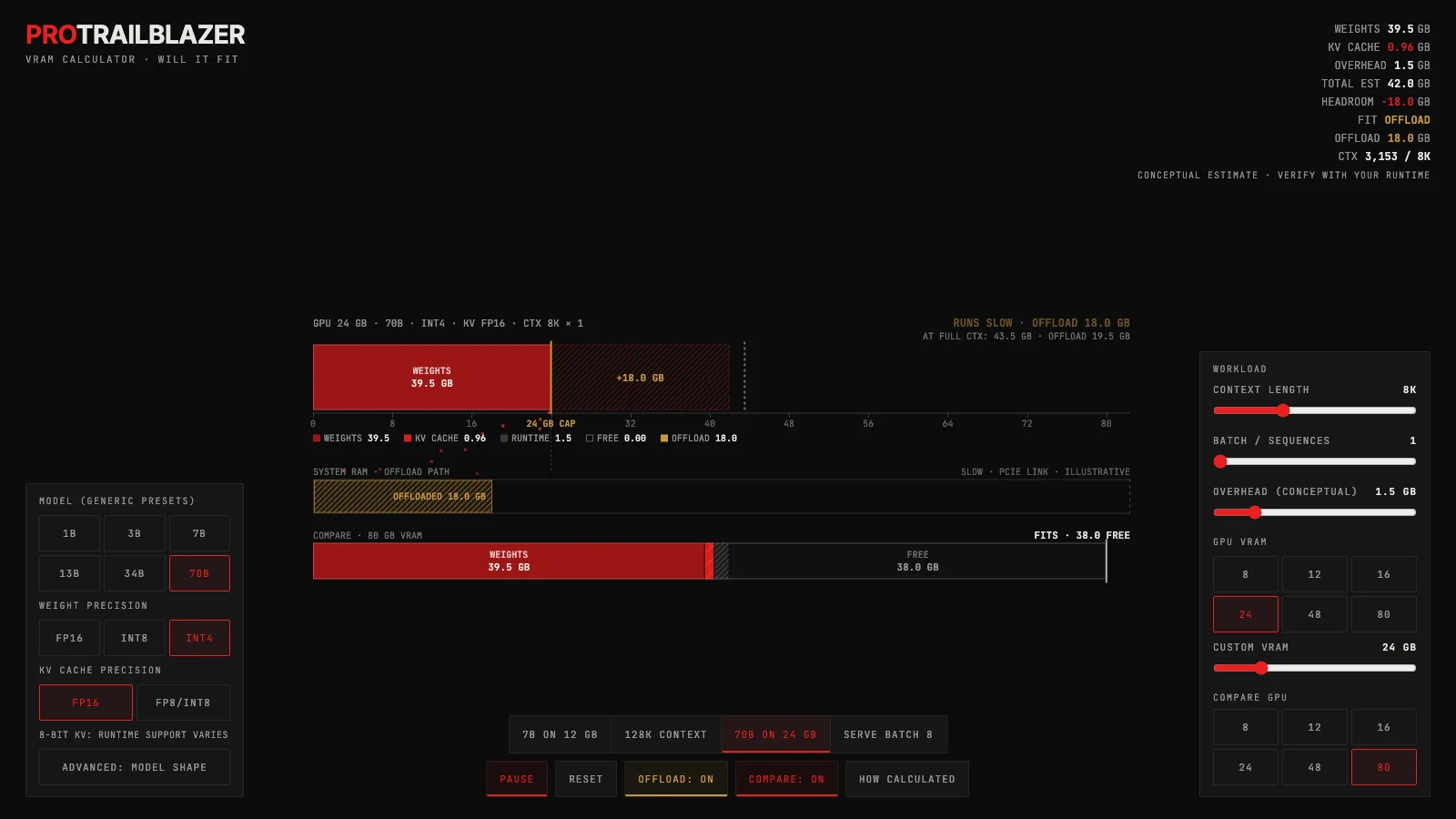
The interactive below lets you set a model size, weight precision, context length, batch size, and GPU capacity, then press play to watch the grow token by token until it either fits, spills into system RAM, or overflows entirely. Use the scenario presets to jump straight to the situations that catch people off guard.
Demo
LLM VRAM calculator: will it fit?
Model weights, a growing KV cache, and runtime overhead fill a GPU memory bar in real time. Overflow spills into a system RAM tray or flags does-not-fit, and a compare bar tests a second GPU against the same demand.
What you're seeing
The main element is a horizontal GPU memory bar divided into three colored segments. The red segment on the left is weight memory, fixed at load time. The amber-tinted segment in the middle is the KV cache, which grows rightward with each token as the play session runs. A smaller segment at the right edge represents runtime overhead, controlled by the overhead slider. A vertical white line marks the GPU's VRAM capacity.
When the total demand exceeds the capacity line, the overflow drains downward into an OFFLOAD tray labeled slow / illustrative (when the CPU offload toggle is on) or the bar edge turns red and flags DOES NOT FIT (when offload is off). A second GPU compare bar can appear below the main bar on the same GB scale, letting you test whether a larger card absorbs the same demand.
The HUD across the top (or the bottom sheet on narrow screens) tracks weight memory, KV cache, overhead, total estimate, headroom, fit status, offloaded GB, and current context tokens in real time. Every number in the demo is derived from the formulas shown in the collapsible how-calculated panel: weights = params x effective bits / 8 (INT4 at about 4.85 effective bits; INT8 at about 8.5); KV cache = 2 x layers x (hidden / GQA divisor) x bytes-per-value x context x batch. These are planning estimates, not benchmarks. Real requirements vary by framework, kernel, quantization layout, KV paging, and model-specific architecture details.
A few things to try:
- Load the "128K context" preset. The 7B model's weights take about 7 GB at INT4, but the KV cache alone grows past 16 GB by the time the context fills. Watch a card that looks fine at short context get crushed as the session extends.
- Try "70B on 24 GB" and enable the compare bar with an 80 GB card. At FP16 a 70B model's weights alone exceed 130 GB. Even at INT4 (about 39.5 GB for weights) the 24 GB card cannot hold just the weights, while the 80 GB card fits the full session with room left over.
- Load "serve batch 8" and watch the KV cache. Batch serving stores eight separate KV caches against one shared copy of the weights. The weight bar does not grow, but the cache bar multiplies by eight, which is why serving hardware needs far more VRAM than a single-user chat setup.
- Toggle CPU offload on versus off during an overflow. With offload on, the overflow drains into the amber tray and the session continues, flagged as slow. With offload off the bar turns red and stops. This illustrates the real tradeoff: offload lets you run something that does not fit, but every offloaded gigabyte must cross the PCIe bus at inference time.
- Open the how-calculated panel and change the model to CUSTOM. Edit params, layers, hidden size, and the GQA divisor directly to match an architecture you care about. The bar and HUD recalculate live.
How VRAM demand is actually calculated
Weight memory is the simplest part. Each parameter is stored at a given precision: FP16 uses 2 bytes, INT8 uses about 1.06 bytes (including scale metadata), and INT4 uses about 0.61 bytes (4.85 effective bits including group-scale overhead). Multiply parameters by bytes per parameter and you have the weight footprint. A 7B model at INT4 needs roughly 4.3 GB for weights; at FP16 it needs 14 GB.
The is where the surprises happen. For each token in the , every stores a key vector and a value vector. The formula is: 2 (for keys and values) x layers x (hidden size / GQA divisor) x bytes per value x context length x batch. At FP16 with a 7B model (32 layers, hidden 4096, GQA divisor 1, 2K context, batch 1) the cache is about 0.5 GB. At 128K context the same model needs over 16 GB for the cache alone. That is why a card that handles a short session can fail later in a long conversation.
Runtime overhead covers the activations, framework buffers, CUDA context, and workspace tensors that live in VRAM during inference but are not part of the weights or cache. The demo models this as an explicit slider from 0.5 to 6 GB, labeled conceptual because the real number depends on framework, kernel implementation, batch size, and whether you are doing speculative decoding or multimodal preprocessing. The slider is not a formula; it is an honest acknowledgment that something is there.
GQA (grouped-query attention) is worth understanding here. Standard stores one KV head per attention head, so the cache scales with the full head count. Many modern models use GQA, where multiple query heads share a single KV head. The GQA divisor in the advanced panel controls this ratio: a divisor of 8 means 8 query heads share one KV pair, cutting the KV cache to one-eighth of what standard MHA would need. The default model shapes in the demo use GQA divisors that loosely reflect current open-weight families.
Why fit status changes during a session
When a model loads, only the weights and overhead are in memory. The KV cache starts empty and grows with every token generated. This means fit status is not a static property of a model-and-GPU pairing: it is a function of how far into a conversation you are.
The calculator shows four fit states. FITS means total demand is below VRAM with at least 10 percent headroom. TIGHT FIT means less than 10 percent remains, flagged in amber as a warning that a longer session or a heavier batch will overflow. RUNS SLOW / OFFLOAD means the model technically runs but some memory lives in system RAM, crossing the PCIe bus at every token. DOES NOT FIT means offload is off and there is no path to run the model at the current settings.
The practical implication: if you are choosing a GPU for local inference, do not size for just the weights. Size for the weights plus the KV cache at the context length you actually plan to use, plus a buffer for overhead. The 128K context scenario in the demo demonstrates why a 12 GB card that runs a 7B model at short context cannot finish a long document analysis session.
For a deeper look at what happens inside the model during each step of generation, including how the KV cache feeds into each autoregressive token step, see the generation walkthrough. For how inference-time strategies like best-of-N and chain-of-thought amplify the compute and memory demand per request, see the inference-time compute explainer.
Frequently asked questions
What is the minimum VRAM needed to run a 7B model?
At INT4 precision, a 7B model's weights need roughly 4 to 5 GB. Add 0.5 to 1 GB of runtime overhead and you can load and run at short context on an 8 GB card. The problem is that the KV cache can easily grow another 4 to 16 GB depending on context length and batch size, so 8 GB is a tight fit for anything beyond short sessions. A 12 GB card gives substantially more headroom.
Does quantization fix the KV cache problem?
Quantization shrinks the weights, not the KV cache by default. You can quantize the KV cache separately (FP8 or INT8 KV is increasingly common), but that is a separate toggle from weight precision. The demo lets you set KV cache precision independently (FP16 vs FP8/INT8) to show the difference. At long context the cache often exceeds the weight footprint, so quantizing only the weights while leaving the cache at FP16 does not help as much as people expect.
Why does batch size multiply the KV cache but not the weights?
The weights are shared across all sequences in a batch: every request reads the same weight values in parallel. But each request has its own sequence of , and each sequence needs its own key and value vectors cached at every layer. So running 8 concurrent requests stores 8 separate KV caches against a single shared copy of the model. The demo's serve batch 8 preset makes this visible: the weight bar stays fixed while the KV bar multiplies.
What does CPU offload actually mean for performance?
When the total memory demand exceeds VRAM, some tensors are moved to system RAM. At inference time, the model reads those tensors back over the PCIe bus, which is roughly 10 to 50 times slower than reading from VRAM depending on the bus generation and what is being transferred. Offload lets you run a model that would otherwise not fit, but generation speed drops substantially, often to single-digit tokens per second or worse. The demo labels the offload tray as slow / illustrative to make this clear.
Why are the numbers in the demo labeled as estimates?
The formulas in the demo are planning estimates based on parameter counts, precision widths, and architecture shapes. Real inference adds framework memory (PyTorch, llama.cpp, vLLM each have different overheads), CUDA context, KV paging structures, optional speculative decoding buffers, multimodal preprocessing tensors, and OS memory pressure. The demo's how-calculated panel lists these caveats explicitly. Use the estimates to understand which factor dominates and to size hardware; do not treat the numbers as exact measurements for a specific model and framework.
Key takeaways
- VRAM demand is not one number. The weights are fixed at load time, but the KV cache grows with every token of context, so a model that loads fine can overflow the same card later in a long session.
- Quantization shrinks the weights, not the KV cache. In the 128K context scenario the 7B model's weights take about 7 GB while the cache alone grows to 16 GB, so at long context the cache is what sinks you.
- Quantized weights cost more than their nominal width. Counting scale factors and metadata, INT4 is about 4.85 effective bits per weight, which is why a '4-bit' 70B model still needs about 39.5 GB for weights before a single token is processed.
- Batch multiplies the KV cache, not the weights. Serving eight concurrent sequences stores eight separate caches against one shared copy of the model, which is why serving hardware needs far more memory than a single chat.
- CPU offload turns 'does not fit' into 'runs slow', not into 'fits fine'. Every offloaded gigabyte has to cross the PCIe link during generation, so treat the offload tray as a warning, not a solution.