Prompt engineering: how technique shapes what models say
Last updated: April 24, 2026
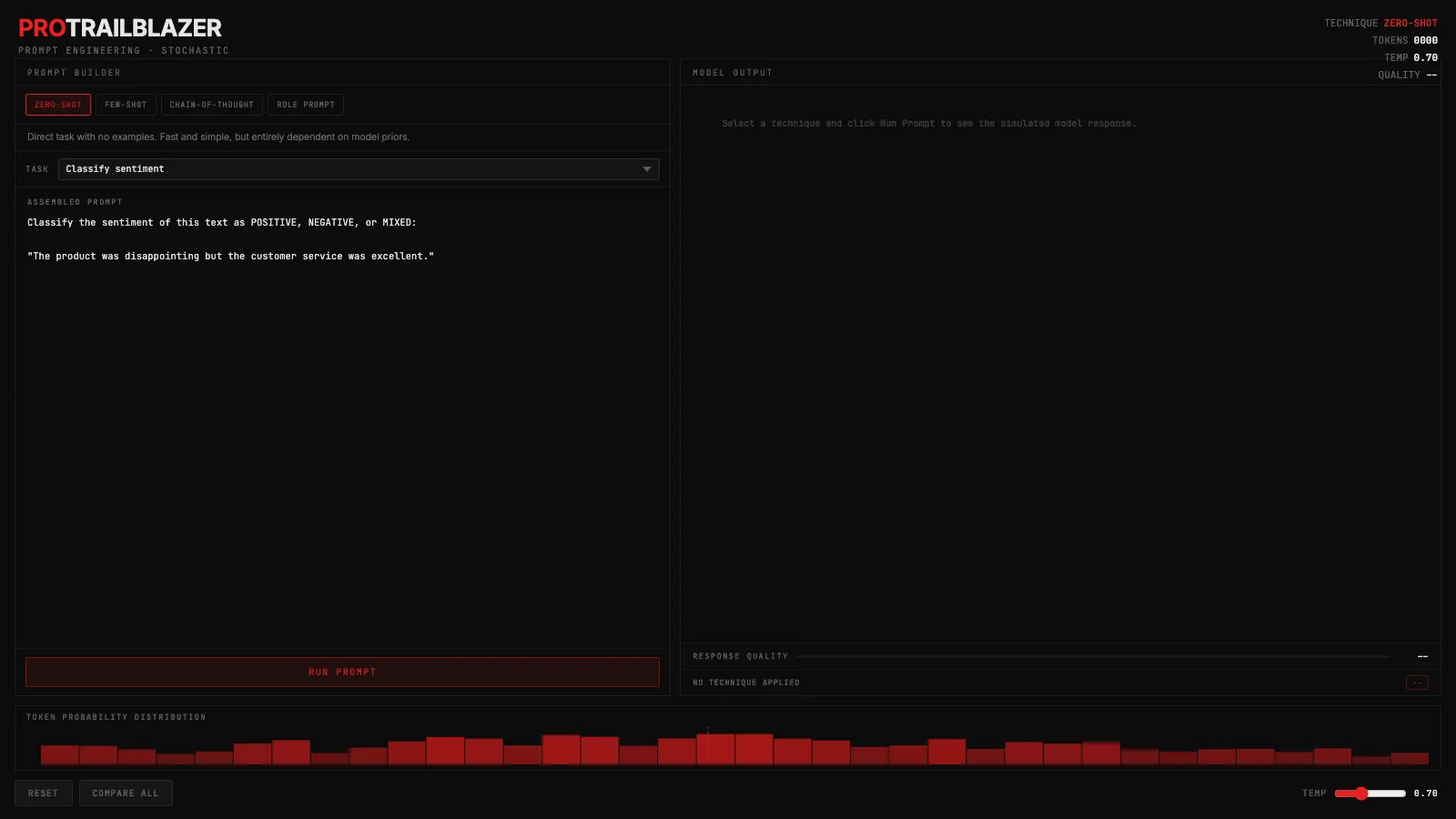
The interactive below shows four prompting techniques applied to the same task. Switch techniques using the tabs in the left panel, choose a task from the dropdown, and click Run Prompt. The assembled prompt updates live so you can see exactly what changes between techniques.
Demo
Prompt engineering techniques
Pick a technique (zero-shot, few-shot, chain-of-thought, or role prompt), pick a task, and run it. Watch how the assembled prompt changes and how technique shifts the simulated token probability distribution.
What you're seeing
The left panel is the prompt builder. Switching technique tabs rewrites the assembled prompt in real time: zero-shot sends the raw task, few-shot adds example input-output pairs before it, chain-of-thought appends a step-by-step reasoning cue, and role prompt opens with an expert persona. The text that appears is exactly what would be sent to the model.
The right panel shows simulated model output, streaming in character by character the way a real API response feels. The quality bar is a rough score for how well the technique fits the task. Click 'Compare all' to see a ranked breakdown of all four techniques side by side for the current task.
At the bottom is the token probability histogram. It shows a simulated distribution over next-token candidates. Clearer techniques produce a taller, more peaked histogram. Drag the temperature slider toward 2.0 and watch the bars flatten.
A few things to try in the demo:
- Switch from zero-shot to chain-of-thought on the same task. Read what the prompt becomes and how the output changes. The quality difference is most visible on 'Debug code' and 'Explain a concept'.
- Drag the temperature slider to 1.8. Watch the histogram flatten as the model becomes less certain which token comes next. Then run the same task and check whether the quality score drops.
- Click 'Compare all'. The overlay ranks all four techniques for the current task. Haiku and sentiment have different top answers.
- Switch to 'Custom prompt' and type your own task. The technique tabs still control how the assembled prompt is framed around your input.
How it actually works
When a language model generates a response, it picks each word one piece at a time from a ranked probability distribution. Each of those pieces is a , typically a few characters to a short word. The full sequence of past tokens, including your prompt, conditions what comes next. That is why phrasing matters: different prompt structures activate different token-prediction patterns learned during training. The how LLMs generate text post goes deeper on the token-by-token mechanics.
Few-shot prompting works because the examples you include shift the conditional distribution over next tokens before the model starts generating your answer. The model doesn't learn from your examples the way fine-tuning does. It reads them as context, and that context narrows the likely range of outputs toward the format and style you demonstrated.
is effective for a specific reason: the reasoning tokens that appear before the final answer condition that final answer. When the model writes 'Step 1: the bug is...' it is conditioning its own next output on what it just wrote. That self-scaffolding steers the final tokens toward more accurate responses on complex tasks, and it is why chain-of-thought dramatically improves accuracy on math, code, and multi-step reasoning while barely moving the needle on simple recall.
is applied to the raw (the model's unnormalized scores for each candidate token) before converts them to probabilities. Low temperature sharpens the distribution, making the top token dominant. High temperature flattens it, letting lower-ranked tokens compete. The histogram in the demo visualizes this directly. The temperature explainer covers the full mechanics.
Role prompting shifts vocabulary and reasoning style by activating associations the model built from domain-specific training text. 'You are a senior Python engineer' doesn't add new knowledge. It routes the response toward the language patterns, caveats, and structure that appeared in the training data for that type of expert. The model learned what engineers say; you're reminding it which part of that space you want to be in.
When to use which technique
Zero-shot works when the task is clear and the model has strong priors for it. Asking for a summary, a translation, or a simple classification tends to work fine without examples. It is the right starting point before you add complexity.
Few-shot pays off when the output format needs to be consistent across many runs, or when the task involves a structure the model doesn't naturally produce. Add examples that show the exact format you want, not just that you want something 'like this'.
Chain-of-thought earns its extra tokens when the final answer depends on getting intermediate steps right: multi-step math, code debugging, logical deduction. It is rarely worth the token cost on simple lookup or recall tasks.
Role prompting helps when the response needs a specific register, vocabulary, or expertise level. It is less about changing what the model knows and more about which part of its knowledge to draw from. If the domain is specialized enough that word choice matters, a role framing is worth one or two sentences of setup.
Key takeaways
- Better prompting doesn't change the model's knowledge. It changes which part of what the model already knows shows up in the output.
- Chain-of-thought improves accuracy because intermediate reasoning tokens condition the final answer tokens, not because the model becomes smarter mid-generation.
- Temperature and technique are independent controls. Temperature governs how random the sampling is; technique governs what part of the distribution the model is sampling from.
- There is no universal best technique. Chain-of-thought wins on complex reasoning, few-shot wins on format consistency, and role prompting wins when you need domain vocabulary. The 'Compare all' button in the demo shows this task by task.